
Enter Room page
Learn how to set up the Enter Room page on Next.js
In this guide, you will build the Enter Room page:
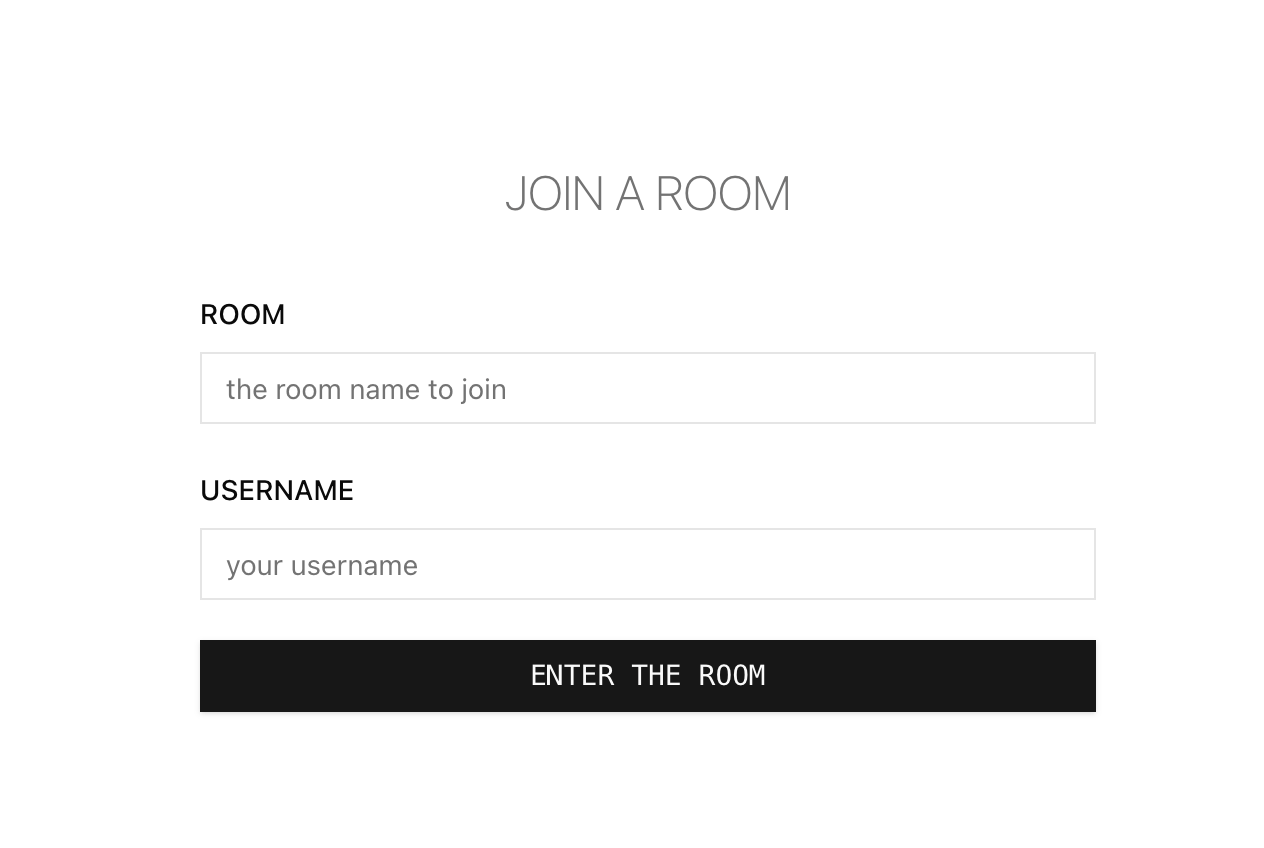
This page allows users to define the room they wish to join and set their username.
Prerequisites
Before you begin, ensure that you have completed the frontend installation guide, up to the "Set up the Enter Room page" step.
Step by step
To set up the Enter Room page in your Next.js project, follow these steps:
Install the UI building block components
Set up the necessary Shadcn/UI components for the Enter Room page.
Use the Shadcn/UI CLI and accept all the default options.
From the project root folder, follow these steps:
Define the base styles
Adjust the styling of the Enter Room page.
Replace the contents of app/globals.css with:
@tailwind base;
@tailwind components;
@tailwind utilities;

@layer base {
  * {
    @apply border-border outline-ring/50;
  }
  html {
    @apply w-full h-full outline-transparent;
  }
  body {
    @apply w-full h-full outline-transparent bg-background text-foreground;
  }
  :root {
    --background: 0 0% 100%;

    --foreground: 0 0% 3.9%;

    --card: 0 0% 100%;

    --card-foreground: 0 0% 3.9%;

    --popover: 0 0% 100%;

    --popover-foreground: 0 0% 3.9%;

    --primary: 0 0% 9%;

    --primary-foreground: 0 0% 98%;

    --secondary: 0 0% 96.1%;

    --secondary-foreground: 0 0% 9%;

    --muted: 0 0% 96.1%;

    --muted-foreground: 0 0% 45.1%;

    --accent: 0 0% 96.1%;

    --accent-foreground: 0 0% 9%;

    --destructive: 0 84.2% 60.2%;

    --destructive-foreground: 0 0% 98%;

    --border: 0 0% 89.8%;

    --input: 0 0% 89.8%;

    --ring: 0 0% 3.9%;

    --chart-1: 12 76% 61%;

    --chart-2: 173 58% 39%;

    --chart-3: 197 37% 24%;

    --chart-4: 43 74% 66%;

    --chart-5: 27 87% 67%;

    --radius: 0.5rem;
  }
  .dark {
    --background: 0 0% 3.9%;

    --foreground: 0 0% 98%;

    --card: 0 0% 3.9%;

    --card-foreground: 0 0% 98%;

    --popover: 0 0% 3.9%;

    --popover-foreground: 0 0% 98%;

    --primary: 0 0% 98%;

    --primary-foreground: 0 0% 9%;

    --secondary: 0 0% 14.9%;

    --secondary-foreground: 0 0% 98%;

    --muted: 0 0% 14.9%;

    --muted-foreground: 0 0% 63.9%;

    --accent: 0 0% 14.9%;

    --accent-foreground: 0 0% 98%;

    --destructive: 0 62.8% 30.6%;

    --destructive-foreground: 0 0% 98%;

    --border: 0 0% 14.9%;

    --input: 0 0% 14.9%;

    --ring: 0 0% 83.1%;

    --chart-1: 220 70% 50%;

    --chart-2: 160 60% 45%;

    --chart-3: 30 80% 55%;

    --chart-4: 280 65% 60%;

    --chart-5: 340 75% 55%;
  }
}

@layer base {
  * {
    @apply border-border;
  }
  body {
    @apply bg-background text-foreground;
  }
}
Set up the page React component
Create a home folder in the components folder.
Home component
In the components/home folder, create a file named home.tsx with:
"use client";

import React from "react";
import LoginForm from "./login-form";

export const Home = () => {
  return (
    <>
      <main className="w-full h-full">
        <section
          className="relative flex h-full w-full flex-col items-center justify-center p-6"
        >
          <h3 className="text-2xl font-noto-sans-mono font-extralight text-muted-foreground uppercase mb-8">
            Join a Room
          </h3>
          <LoginForm />
        </section>
      </main>
    </>
  );
};
LoginForm component
In the components/home folder, create a file named login-form.tsx with:
"use client";

import { v4 as uuidv4 } from "uuid";
import React from "react";
import { useRouter } from "next/navigation";
import { z } from "zod";
import { zodResolver } from "@hookform/resolvers/zod";
import { useForm } from "react-hook-form";
import {
  Form,
  FormControl,
  FormField,
  FormItem,
  FormLabel,
  FormMessage,
} from "@/components/ui/form";
import { Input } from "@/components/ui/input";
import { Button } from "@/components/ui/button";
import { useCollaborationRoom } from "@/store/store";

const formSchema = z
  .object({
    username: z
      .string()
      .trim()
      .min(1, { message: "The username is required" })
      .max(50, { message: "The username must be maximum 50 characters long" }),
    roomId: z
      .string()
      .trim()
      .min(1, { message: "The room name is required" })
      .max(50, { message: "The room name must be maximum 50 characters long" }),
  })
  .required();

function LoginForm() {
  const router = useRouter();

  const setRoom = useCollaborationRoom((state) => state.setRoom);
  const setUser = useCollaborationRoom((state) => state.setUser);

  const form = useForm<z.infer<typeof formSchema>>({
    resolver: zodResolver(formSchema),
    defaultValues: {
      username: "",
      roomId: "",
    },
  });

  function onSubmit(values: z.infer<typeof formSchema>) {
    setRoom(values.roomId);
    setUser({
      id: `${values.username}-${uuidv4()}`,
      name: values.username,
      email: `${values.username}@weavejs.com`,
    });
    router.push(`/rooms/${values.roomId}?userName=${values.username}`);
  }

  return (
    <div className="w-full max-w-md">
      <Form {...form}>
        <form
          onSubmit={form.handleSubmit(onSubmit)}
          className="w-full space-y-5"
        >
          <FormField
            control={form.control}
            name="roomId"
            render={({ field }) => (
              <FormItem>
                <FormLabel className="font-noto-sans-mono">ROOM</FormLabel>
                <FormControl>
                  <Input
                    placeholder="the room name to join"
                    className="font-noto-sans-mono rounded-none shadow-none"
                    {...field}
                  />
                </FormControl>
                <FormMessage />
              </FormItem>
            )}
          />
          <FormField
            control={form.control}
            name="username"
            render={({ field }) => (
              <FormItem>
                <FormLabel className="font-noto-sans-mono">USERNAME</FormLabel>
                <FormControl>
                  <Input
                    placeholder="your username"
                    className="font-noto-sans-mono rounded-none shadow-none"
                    {...field}
                  />
                </FormControl>
                <FormMessage />
              </FormItem>
            )}
          />
          <Button
            type="submit"
            className="w-full cursor-pointer font-mono rounded-none"
          >
            ENTER THE ROOM
          </Button>
        </form>
      </Form>
    </div>
  );
}

export default LoginForm;
Define the page component
Replace the contents of the file app/page.tsx with:
import { Home } from "@/components/home/home";

export default function HomePage() {
  return <Home />;
}
Run the project
Once the Enter Room page setup is complete, run the project by executing the following command:
npm run devNavigate to http://localhost:3000 in a browser.
You should see the following:
Next steps
Set up the Room page of the Next.js application.