Karate Clients - JMS
Java Client (JMS Send and JMS Consume) to interact with JMS queues from karate.
It provides features to send and consume JMS Messages (TextMessage or ObjectMessage) for a Queue:
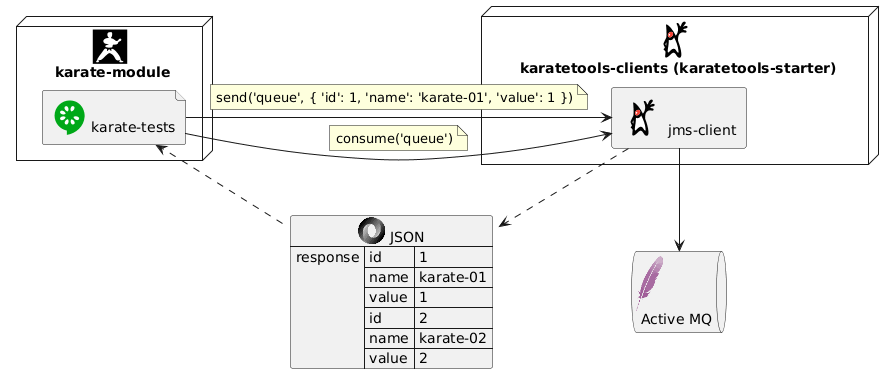
-
How to set it up:
-
Define (if applicable) the JMS client dependencies in the project POM
-
Define (if applicable) the JMS Object Classes in the project POM
-
Define the JMS client configuration in the file src/test/resources/config/jms/<jms-provider>-<env>-config.yml
-
-
How to use it in the karate files:
The Supported JMS Providers are:
POM Configuration
POM Karate Tools
| If the project has been generated using the Karate Tools Archetype the pom will already contain the corresponding configuration. |
Add the karatetools dependency in the karate pom:
<properties>
  ...
  <!-- Karate Tools -->
  <karatetools.version>X.X.X</karatetools.version>
</properties>

<dependencies>
  ...
  <!-- Karate Tools -->
  <dependency>
    <groupId>dev.inditex.karate</groupId>
    <artifactId>karatetools-starter</artifactId>
    <version>${karatetools.version}</version>
    <scope>test</scope>
  </dependency>
</dependencies>
POM Client Factory
Apache Active MQ POM
karatetools-starter already includes the Active MQ JMS dependencies.
If you need to change the dependency version, you can include it in the pom as follows:
  <properties>
    ...
    <!-- Karate Clients -->
    <!-- Karate Clients - JMS -->
    <!-- Karate Clients - JMS - ActiveMQ -->
    <artemis-jms-client.version>X.X.X</artemis-jms-client.version>
  </properties>

  <dependencies>
    ...
    <!-- Karate Clients - JMS -->
    <!-- Karate Clients - JMS - ActiveMQ -->
    <dependency>
      <groupId>org.apache.activemq</groupId>
      <artifactId>artemis-jms-client</artifactId>
      <version>${artemis-jms-client.version}</version>
    </dependency>
  </dependencies>
POM JMS Object
The JMS Client is cappable of processing JMS TextMessage or ObjectMessage.
In order to process JSM ObjectMessages you might need to add in the pom.xml the dependency to the module with the JMS Object classes.
-
POM Properties
<properties> ... <!-- Karate Clients - JMS - JMS Objects --> <xxxxxx-jms-module.version>X.X.X</xxxxxx-jms-module.version> ... </properties> -
POM Dependencies
  <dependencies>
    ...
    <!-- Karate Clients - JMS - JMS Objects -->
    <dependency>
      <groupId>com.mycompany.api</groupId>
      <artifactId>xxxxxx-jms-module</artifactId>
      <version>${xxxxxx-jms-module.version}</version>
    </dependency>
    ...
  </dependencies>
Client Configuration
Configuration parameters for the JMS Clients. These values can be overwritten by the corresponding system properties. System properties can be injected by CI/CD.
| If the project has been generated using the Karate Tools Archetype the archetype would have prompted for the creation of the configuration files. |
This client can be configured for multi-environment execution with a config file per environment:
\---src
    \---test
        \---resources
            \---config
                \---jms
                    <provider>-config-local.yml
                    ...
                    <provider>-config-pre.yml
For example:
\---src
    \---test
        \---resources
            \---config
                \---jms
                    activemq-config-local.yml
                    ...
                    activemq-config-pre.yml
JMS Client Configuration Properties - Apache Active MQ
⚙️ jmsFactory - JMS Factory to use: ActiveMQ
⚙️ brokerURL - URL of the Active MQ broker
⚙️ username - User name that application uses to connect to ActiveMQ
⚙️ password - Password that the application uses to connect to ActiveMQ
⚙️ sendTimeout - Timeout in milliseconds for sending messages (default 5000)
# docker-compose environment variables:  <AMQ_USER> <AMQ_PASSWORD>
# docker-compose folder structure:       NA
jmsFactory: ActiveMQ
brokerURL: tcp://localhost:61616
username: karate
password: karate-pwd
Client Features and Usage
Instantiate JMSClient
New instance of the JMSClient providing the configuration as a map loaded from a yaml file.
public JMSClient(final Map<Object, Object> configMap)# public JMSClient(final Map<Object, Object> configMap)
# Instantiate JMSClient
Given def config = read('classpath:config/jms/jms-config-' + karate.env + '.yml')
Given def JMSClient = Java.type('dev.inditex.karate.jms.JMSClient')
Given def jmsClient = new JMSClient(config)Check if JMS is available
Checks if the JMS connection can be established
Returns true is connection is available, false otherwise
public Boolean available()# public Boolean available()
When def available = jmsClient.available()
Then if (!available) karate.fail('JMS Client not available')Send a message to a queue
Send a message to a queue
For example:
Given def jmsMessageJSON = {'id': '1', 'name': 'karate-01', 'value': 1}Given def jmsMessagePlainText = 'Plain Text Message'Given text jmsMessageXML =
"""
<?xml version="1.0"?>
<karate id="1">
<name>karate-01</name>
<value>1</value>
</karate>
"""
In order for an XML to be sent as JMS Text Message you need to use text (with enclosed content """) instead of def (def converts to Map anything that looks like JSON/XML).
|
Given def JMSKarateObject = Java.type('dev.inditex.karate.jms.JMSKarateObject')
Given def jmsMessageObject = new JMSKarateObject("2", "karate-02", 2)public void send(final String queue, final Object value)# Define Queue
Given def queue = 'global.core.karate.public.queue'
# public void send(final String queue, final Object value)
# Send Message without properties
Given def jmsMessageJSON = {'id': '1', 'name': 'karate-01', 'value': 1}
When jmsClient.send(queue, jmsMessageJSON)# Define Queue
Given def queue = 'global.core.karate.public.queue'
# public void send(final String queue, final Object value)
# Send Message without properties
Given def jmsMessagePlainText = 'Plain Text Message'
When jmsClient.send(queue, jmsMessagePlainText)# Define Queue
Given def queue = 'global.core.karate.public.queue'
# public void send(final String queue, final Object value)
# Send Message without properties
Given text jmsMessageXML =
"""
<?xml version="1.0"?>
<karate id="1">
  <name>karate-01</name>
  <value>1</value>
</karate>
"""
When jmsClient.send(queue, jmsMessageXML)# Define Queue
Given def queue = 'global.core.karate.public.queue'
# public void send(final String queue, final Object value)
Given def JMSKarateObject = Java.type('dev.inditex.karate.jms.JMSKarateObject')
Given def jmsMessageObject = new JMSKarateObject("2", "karate-02", 2)
When jmsClient.send(queue, jmsMessageObject)Send a message to a queue with optional properties
Send a message to a queue with defined properties (optional)
For example:
Given def jmsMessageJSON = {'id': '1', 'name': 'karate-01', 'value': 1}Given def jmsMessagePlainText = 'Plain Text Message'Given text jmsMessageXML =
"""
<?xml version="1.0"?>
<karate id="1">
<name>karate-01</name>
<value>1</value>
</karate>
"""
In order for an XML to be sent as JMS Text Message you need to use text (with enclosed content """) instead of def (def converts to Map anything that looks like JSON/XML).
|
Given def JMSKarateObject = Java.type('dev.inditex.karate.jms.JMSKarateObject')
Given def jmsMessageObject = new JMSKarateObject("2", "karate-02", 2){ 'PRINT_STATUS': 'PRINTING' }public void send(final String queue, final Object value, final Map<String, Object> properties)# Define Queue
Given def queue = 'global.core.karate.public.queue'
# public void send(final String queue, final Object value, final Map<String, Object> properties)
# Send Message with properties
Given def jmsMessageJSON = {'id': '1', 'name': 'karate-01', 'value': 1}
Given def jmsProperties = {'PRINT_STATUS':'PRINTING'}
When jmsClient.send(queue, jmsMessageJSON, jmsProperties)
# Send Message without properties
When jmsClient.send(queue, jmsMessageJSON, null)# Define Queue
Given def queue = 'global.core.karate.public.queue'
# public void send(final String queue, final Object value, final Map<String, Object> properties)
# Send Message with properties
Given def jmsMessagePlainText = 'Plain Text Message'
Given def jmsProperties = {'PRINT_STATUS':'PRINTING'}
When jmsClient.send(queue, jmsMessagePlainText, jmsProperties)
# Send Message without properties
When jmsClient.send(queue, jmsMessagePlainText, null)# Define Queue
Given def queue = 'global.core.karate.public.queue'
# public void send(final String queue, final Object value, final Map<String, Object> properties)
# Send Message with properties
Given text jmsMessageXML =
"""
<?xml version="1.0"?>
<karate id="1">
  <name>karate-01</name>
  <value>1</value>
</karate>
"""
Given def jmsProperties = {'PRINT_STATUS':'PRINTING'}
When jmsClient.send(queue, jmsProperties, null)
# Send Message without properties
When jmsClient.send(queue, jmsMessageXML, null)# Define Queue
Given def queue = 'global.core.karate.public.queue'
# public void send(final String queue, final Object value, final Map<String, Object> properties)
# Send Message with properties
Given def JMSKarateObject = Java.type('dev.inditex.karate.jms.JMSKarateObject')
Given def jmsMessageObject = new JMSKarateObject("2", "karate-02", 2)
Given def jmsProperties = {'PRINT_STATUS':'PRINTING'}
When jmsClient.send(queue, jmsMessageObject, jmsProperties)
# Send Message without properties
When jmsClient.send(queue, jmsMessageObject, null)Consume Messages from a queue
Receive the next messages in the queue within the default timeout interval (5000ms) or custom timeout interval.
Returns a JSON Array representing the obtained messages, where each row is a map << field name, message value >>
For example:
[
  { "id": 1, "name": "karate-01", "value": 1 },
  { "id": 2, "name": "karate-02", "value": 2 }
][
{ "textMessage": "Plain Text Message" },
{ "textMessage": "<?xml version=\"1.0\"?>\n<karate id=\"1\">\n <name>karate-01</name>\n <value>1</value>\n</karate>" }
]public List<Map<String, Object>> consume(final String queue)# Define Queue
Given def queue = 'global.core.karate.public.queue'
# public List<Map<String, Object>> consume(final String queue)
When def messages = jmsClient.consume(queue)
Then karate.log('messages=', messages)
Then assert messages.length == 2
Then def result = karate.sort(messages, x => x.id)
Then match result[0].id == '1'
Then match result[0].name == 'karate-01'
Then match result[0].value == 1
Then match result[1].id == '2'
Then match result[1].name == 'karate-02'
Then match result[1].value == 2# Define Queue
Given def queue = 'global.core.karate.public.queue'
# public List<Map<String, Object>> consume(final String queue)
When def messages = jmsClient.consume(queue)
Then assert messages.length == 1
Then match messages[0].textMessage == jmsMessagePlainText# Define Queue
Given def queue = 'global.core.karate.public.queue'
# public List<Map<String, Object>> consume(final String queue)
When def messages = jmsClient.consume(queue)
Then assert messages.length == 1
Then match messages[0].textMessage == jmsMessageXMLReceive the next messages in the queue with custom timeout interval.
public List<Map<String, Object>> consume(final String queue, final long timeout)# Define Queue
Given def queue = 'global.core.karate.public.queue'
# public List<Map<String, Object>> consume(final String queue, final long timeout)
When def messages = jmsClient.consume(queue, 10000)
Then assert messages.length == 1
Then match messages[0].textMessage == jmsMessagePlainText